Typing throughput mirrors network bandwidth. Fingers transmit data across a physical interface at measurable character rates every single second. When you assess your typing test speed, you capture the raw processing velocity of your visual, cognitive, and neuromuscular circuits. Most adults type 40 WPM. Elite typists, on the other hand, sustain speeds above 150 WPM on standardized alphanumeric benchmarks across extended testing sessions. Fast typing requires mastering keystroke mechanics.
Speed never guarantees productivity. Bursting forward recklessly introduces brutal latency penalties whenever typographical errors disrupt your rhythm. Every typo halts momentum instantly. Your eyes register the mistake, your brain interrupts the motor queue, and your hand reaches out to strike the backspace key. Output collapses under sloppy execution. True keyboard mastery demands mathematical clarity, hardware tuning, and deliberate practice routines designed to eliminate biomechanical friction.
The Mathematics of Typing Test Speed: Gross vs. Net WPM
Words vary in length. Early telegraph operators faced this variance and developed standardized metrics, which Intersteno later codified for international speed competitions across different languages. Standard tests define one word as five discrete keystrokes. This uniform calculation standardizes letters, numbers, punctuation marks, and whitespace intervals into a single objective measurement.
💡 Pro Tip: Always evaluate typing performance using Net WPM rather than Gross WPM. Net WPM accounts for error correction overhead, which mirrors real-world coding and writing workflows.
Two distinct metrics govern your typing test speed evaluation. Gross WPM calculates raw mechanical keypresses divided by elapsed test time without discounting mistakes. Net WPM subtracts uncorrected errors. This critical deduction guarantees that your recorded benchmark reflects usable, production-ready textual throughput rather than chaotic keystroke spamming.
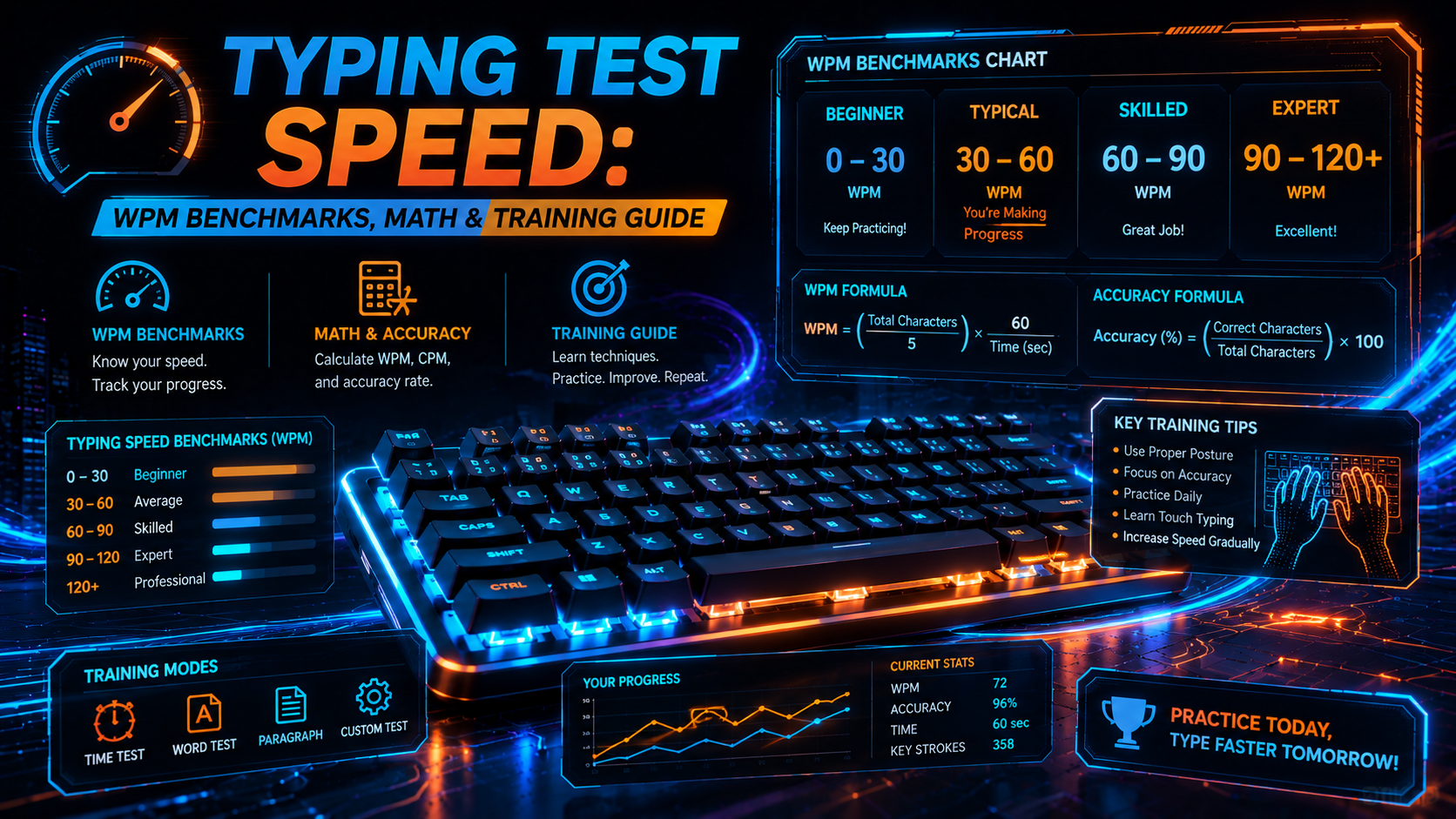
Gross WPM = (Total Keystrokes / 5) / Time (Minutes)
Net WPM = Gross WPM - (Uncorrected Errors / Time in Minutes)
Accuracy (%) = (Correct Keystrokes / Total Keystrokes) * 100
Consider a standard 60-second assessment. Typing 400 characters in one minute yields a gross output of 80 WPM across the keyboard. Four uncorrected errors reduce your net output to 76 WPM. Modern assessment tools like the TypingPulse Speed Test force live inline error correction. This mechanism penalizes mistakes through lost seconds spent backspacing rather than through simple post-test mathematical deductions.
Error recovery carries a steep time cost. Pressing backspace, striking the intended key, and regaining forward typing cadence consumes roughly 350 milliseconds of active time. Six errors waste two full seconds. That brief mechanical stall drags an 85 WPM run down into the low 70s.
Global Typing Test Speed Benchmarks and Percentiles
Where does your velocity rank? Millions of open benchmark sessions reveal distinct statistical tiers across global computer users over years of testing. Casual typists cluster around the median. Dedicated software engineers, medical transcriptionists, and keyboard hobbyists populate the upper percentiles of global leaderboards.
| Speed Tier (WPM) Characters / Min (CPM) Global Percentile Typing Methodology Primary Bottleneck | ||||
| < 25 WPM | < 125 CPM | Bottom 10% | Visual hunt-and-peck (2-4 fingers) | Visual search latency and key localization |
| 25–39 WPM | 125–195 CPM | 10th–40th Percentile | Hybrid hunt-and-peck / partial home row | Inconsistent finger assignments |
| 40–55 WPM | 200–275 CPM | 50th–70th Percentile (Average) | Basic touch typing (8-10 fingers) | Sub-word pauses and backspace recovery |
| 56–75 WPM | 280–375 CPM | 70th–88th Percentile (Proficient) | Standard touch typing with muscle memory | Same-finger bigram friction and punctuation |
| 76–99 WPM | 380–495 CPM | 88th–97th Percentile (Advanced) | Continuous lookahead and multi-character buffering | Eye-span buffer limits and physical fatigue |
| 100–125 WPM | 500–625 CPM | Top 2% (Expert) | Parallelized motor planning and rolling keystrokes | Hardware debounce latency and rare vocabulary |
| 126–160+ WPM | 630–800+ CPM | Top 0.1% (Elite Competitor) | Subconscious chording and predictive streaming | Neuromuscular reaction speed and switch reset |
Test dictionaries warp results. Practicing a simplified 200-word corpus inflates raw scores by 25 percent compared to prose containing symbols and capital letters. True velocity requires complex text. Realistic test paragraphs provide a genuine assessment of functional typing capability.
High speed taxes human biology. Sustaining 130 WPM creates friction in finger flexor tendons and strains forearm muscle groups. Typists who sprint through long sessions without recovery risk chronic strain injuries. Speed progression must respect anatomical limits.
Biomechanical Latency: Eye-Span Buffering and Keystroke Pre-Movement
Fast typing requires biological pipelining. At 100 WPM, you strike a key every 120 milliseconds during continuous text entry. Human visual reaction time averages 200 milliseconds. This biological delay makes conscious key-by-key processing impossible above 50 WPM.
"Elite typists do not read individual letters; they parse complete word contours and dispatch parallel motor commands to their hands."
Breaking past 50 WPM requires two physical adaptations: eye-span buffering and motor chunking. Eye-span buffering describes how far your gaze leads your physical keystrokes across the screen. Your eyes parse word four while your fingers type word two. This lookahead queue feeds letter sequences into your motor cortex well in advance.
Motor chunking compiles recurring letter groups into unified muscle firing patterns. Common bigrams like "th", "er", and "on" fire as fluid finger rolls rather than isolated taps. Your nervous system triggers one coordinated reflex across adjacent fingers for the trigram "the". This fluid sequencing increases your typing test speed during complex paragraphs.
This automated pipeline has one catastrophic vulnerability: buffer overrun. Encountering an unusual word or unexpected punctuation mark derails the motor queue. Your eyes snap backward, your fingers hesitate, and keystroke timing collapses into chaos. Building buffer resilience requires diverse vocabulary practice inside our Interactive Typing Practice arena.
Hardware Bottlenecks: Switch Actuation, Debounce Delays, and Polling
Hardware latency degrades your measured typing test speed. Delays between physical switch contact and operating system registration add friction to rapid bursts. Identifying signal chain bottlenecks helps unlock your keyboard hardware responsiveness.
Every keystroke traverses four hardware stages:
- Physical Pre-Travel: The mechanical distance a switch stem travels before electrical contacts close or magnetic sensors register flux changes.
- Switch Debounce: Firmware algorithms that filter transient electrical noise when metal contact leaves collide.
- Matrix Scan Rate: The frequency at which the keyboard microcontroller polls the switch matrix.
- USB Polling Rate: The interval at which the host computer requests input packets across the USB bus.
Standard Cherry MX switches require two full millimeters of pre-travel and four millimeters of total descent. Modern Hall Effect magnetic switches actuate at depths as shallow as 0.3 millimeters. Shaving over one millimeter of travel distance per keypress saves cumulative mechanical effort across a thousand words. Over a ten-minute typing test, that physical efficiency preserves hand energy.
💡 Pro Tip: Test your keyboard for key chatter, switch bounce, and roll-over limits using our free Online Keyboard Tester to ensure your hardware registers rapid inputs cleanly.
Firmware algorithms introduce hidden latency. Mechanical contact leaves require 5 to 15 milliseconds of debounce delay to prevent chatter. Hall Effect switches eliminate contact leaves entirely. However, ultra-shallow actuation carries a distinct tradeoff: hair-trigger settings increase accidental misfires from resting finger weight.
Systematic Protocols to Increase Your Typing Test Speed
Mindless testing yields poor results. Improving performance requires targeted intervention at specific cognitive and neuromuscular friction points. Apply these engineering steps to optimize your typing test speed systematically.
1. Enforce a Strict Accuracy Baseline (The 97% Rule)
Accuracy must precede speed. Typing below 97 percent accuracy builds erratic muscle memory and ruins motor consistency. Drop your current speed by 20 percent until you make fewer than two mistakes per test. Clean execution at lower speeds creates the neural stability needed for sustained high velocity.
2. Isolate Weak N-Grams and Same-Finger Bigrams
QWERTY contains severe physical inefficiencies. Same-Finger Bigrams (SFBs)—such as typing "ed", "ce", or "un" with the same finger across staggered rows—force one digit to complete two consecutive reaches. Track your slowest letter pairings, then isolate those transitions in repetitive drills. Structured curriculum modules in our Typing Academy Lessons provide tailored exercises to smooth out awkward transitions.
3. Train With Rhythmic Metronome Pacing
Cadence matters. Uneven burst typing exhausts your muscles and fractures visual lookahead. Practice typing to a metronome at 250 beats per minute, striking one key per beat. Steady pacing eliminates erratic micro-pauses and stabilizes neuromuscular rhythm.
4. Optimize Hand Posture and Forearm Alignment
Flat wrists restrict finger movement. Rest on desk surfaces, and you compress the carpal tunnel while limiting lateral finger reach. Raise your wrists slightly above the keycaps so your forearms float parallel to the floor. Floating hands allow larger arm muscles to assist key reaches, reducing finger fatigue.
Benchmarking Platform Comparison and Test Conditions
Assessment environments differ significantly. Comparing scores across platforms requires examining how text corpora and error penalties influence your final typing test speed.
| Platform / Benchmark Text Corpus Style Error Handling Mode Punctuation and Numbers Primary Evaluation Focus | ||||
| TypingPulse Speed Test | Adaptive mixed corpora (Prose & Technical) | Live inline correction & detailed diagnostic analysis | Configurable (Standard / Strict) | Real-world typing bandwidth and motor stability |
| Monkeytype (English 200) | Top 200 common words (no capitals/punctuation) | Configurable (Master / Expert / Normal) | Disabled by default | Pure mechanical actuation and sprint burst speed |
| TypeRacer | Real literature, movie quotes, and lyrics | Strict blocking (must correct every error) | Full punctuation and case sensitivity | Cognitive lookahead under competitive pressure |
| Intersteno World Championship | Multi-page multilingual technical speeches | Post-test penalty deductions (stiff error multipliers) | Complex historical and official transcripts | Long-duration endurance and transcription accuracy |
Brief 15-second sprints test raw motor speed. They reveal nothing about sustained writing stamina. Typists hitting 140 WPM on short tests often collapse to 95 WPM during five-minute technical transcriptions. True typing proficiency requires endurance under realistic punctuation demands.
Summary and Actionable Takeaways
Building high typing test speed is an engineering challenge. Treat typing as a neuromuscular data pipeline. Track your gross and net metrics, eliminate same-finger friction, and remove latency from your hardware setup. With structured practice and disciplined accuracy, breaking through typing plateaus becomes systematic and repeatable.
Frequently Asked Questions
Key answers regarding touch typing, benchmarks, and techniques
TypingPulse
Typing & Tech Specialist
Written by typing trainers and keyboard specialists dedicated to helping students and developers achieve touch typing mastery, ergonomic comfort, and competitive WPM speeds.