Typing throughput determines your digital productivity. When professionals ask what is a good typing speed per minute, the answer depends on their specific technical domain. For everyday computing, a speed between 50 and 65 words per minute (WPM) is considered good, placing you well above the global adult median of 40 WPM. High-volume careers like software engineering, transcription, and journalism, on the other hand, frequently demand 75 to 90+ WPM to eliminate input friction. Evaluating your speed requires analyzing accuracy, cognitive buffering, and mechanical ergonomics.
Raw speed means nothing without precision. A typist sustaining 70 WPM with five errors per minute actually outputs less usable text than a disciplined 50 WPM typist operating at 99 percent accuracy. Every typographical mistake forces an interrupt cycle. Your eyes detect the error, your motor cortex cancels forward planning, and your fingers reach for the backspace key. Error recovery wastes hundreds of milliseconds. Achieving high performance requires balancing raw mechanical velocity against strict error control.
Global Percentile Tiers: What Is a Good Typing Speed per Minute Today?
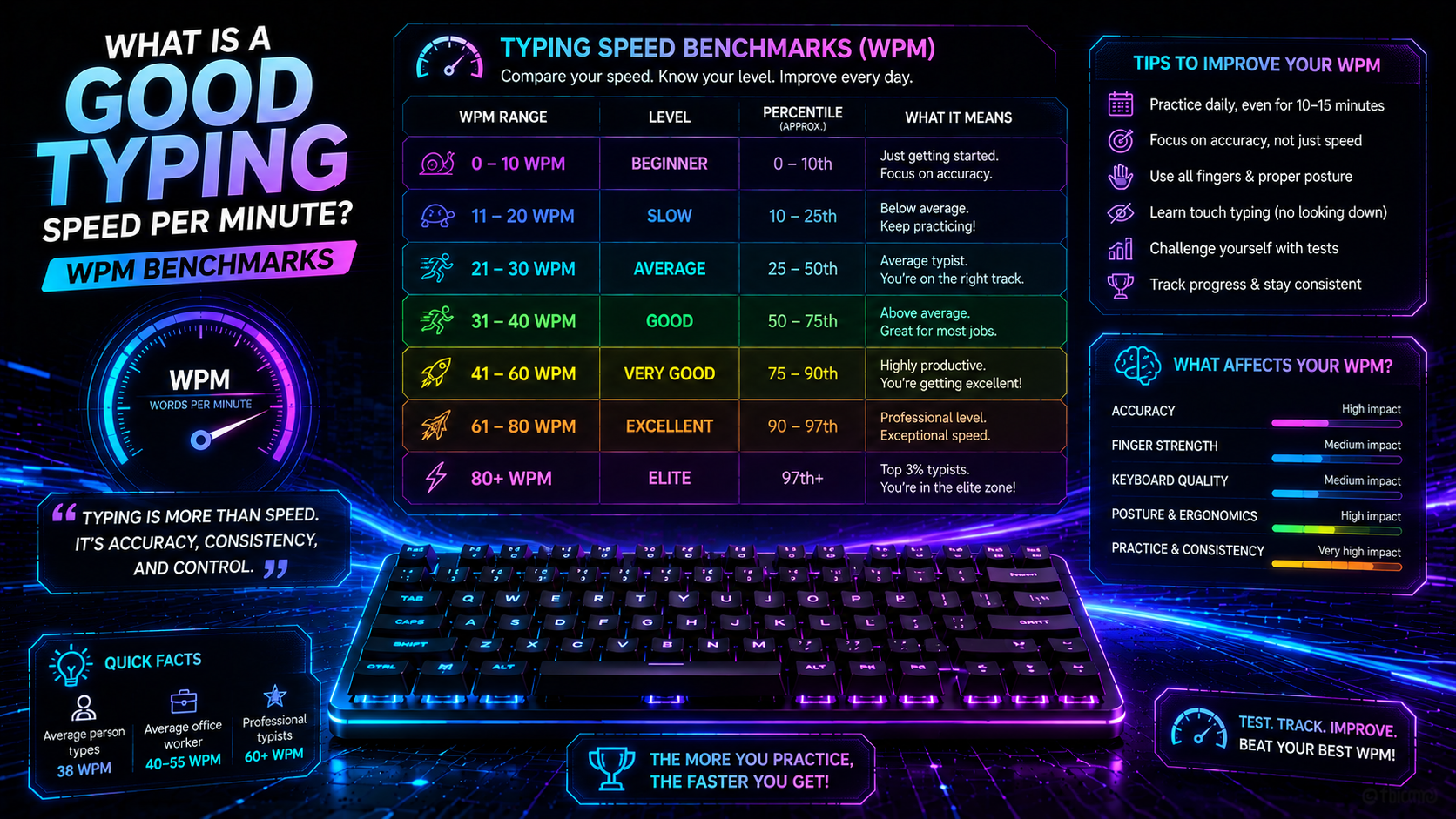
Where does your current speed rank? Empirical keystroke dynamics data gathered from over 136,000 typists by researchers at Aalto University reveals clear statistical boundaries across global keyboard users.
💡 Pro Tip: Benchmark your baseline Net WPM on the TypingPulse Speed Test using full prose with punctuation to measure your true real-world throughput.
| Speed Tier (WPM) | Keystrokes / Min (CPM) | Global Percentile | Typing Technique | Operational Competence |
| < 30 WPM | < 150 CPM | Bottom 20% | Visual hunt-and-peck (2-4 fingers) | Basic search queries and casual web navigation |
| 30–45 WPM | 150–225 CPM | 20th–55th Percentile (Average) | Hybrid multi-finger with frequent glances | Standard emails, chat apps, and casual office work |
| 46–65 WPM | 230–325 CPM | 55th–80th Percentile (Good) | Disciplined touch typing with muscle memory | Professional writing, administrative tasks, and blogging |
| 66–85 WPM | 330–425 CPM | 80th–93rd Percentile (Very Good) | Fluid visual lookahead and n-gram rolls | Software engineering, technical writing, and editing |
| 86–110 WPM | 430–550 CPM | 93rd–99th Percentile (Excellent) | Parallelized motor planning across both hands | Live transcription, legal reporting, and rapid coding |
| 110+ WPM | 550+ CPM | Top 1% (Elite) | Automated subconscious motor streaming | Competitive typing tournaments and stenography |
Test dictionaries warp scores. Practicing a simple 200-word vocabulary test without capitals or punctuation inflates scores by 20 to 30 percent compared to real literature. True mechanical competence shows itself only when typing complex sentences containing commas, semicolons, and numbers.
High speed taxes physical anatomy. Sustaining 80+ WPM across long workdays increases friction across forearm tendon sheaths. Typists must maintain neutral wrist posture to prevent repetitive strain injuries during extended typing sessions.
Career Baselines: What Is a Good Typing Speed per Minute for Your Industry?
Modern workplaces enforce distinct speed thresholds based on daily document volume. While general office roles accept 45 WPM, technical and data-intensive positions treat sub-60 WPM speeds as operational bottlenecks.
Consider the performance requirements across major modern professions:
- General Administration and Clerical: 45 to 55 WPM allows administrative staff to process forms, draft correspondence, and manage schedules efficiently.
- Software Development and DevOps: 55 to 75 WPM enables programmers to write code, navigate terminals, and refactor codebases without breaking creative flow.
- Customer Support and Live Chat: 50 to 65 WPM ensures agents can manage multiple live customer support threads simultaneously without response lag.
- Medical and Legal Transcription: 75 to 95+ WPM is strictly mandatory, paired with a non-negotiable 98 percent accuracy requirement.
- Data Entry Specialists: 65 to 80 WPM ensures high-volume batch processing within target corporate deadlines.
Accuracy dictates real productivity. A developer typing at 80 WPM who makes constant syntax errors wastes valuable minutes debugging typos. A deliberate 60 WPM developer typing clean code achieves faster overall task completion. Clean text entry always beats reckless velocity in engineering environments.
The financial cost of typos is significant. Correcting a single error consumes 400 milliseconds of active time. A typist making six errors per minute loses two full productive hours every single work month purely to backspacing.
Biomechanical Ceilings: Why Typists Stall at 50 WPM
Why do thousands of typists plateau around 50 WPM? This specific threshold marks the boundary between conscious character processing and automated motor chunking. Typists below 50 WPM consciously think about individual letters as they strike keys.
"Breaking through the 50 WPM barrier requires transitioning from letter-by-letter visual verification to multi-character muscle memory rolls."
Visual verification creates severe latency. Looking down at the keyboard introduces a 300-millisecond visual reset every time your gaze shifts from the screen. This constant interruption prevents your brain from establishing an eye-span lookahead buffer. Elite typists look exclusively at upcoming text on screen, allowing their peripheral motor cortex to prepare keypresses three words in advance.
Subconscious motor chunking converts common letter sequences into unified muscle firing patterns. Bigrams like "th", "er", and "in", alongside trigrams like "the" and "ion", execute as single fluid rolls across adjacent fingers. Learning these coordinated finger patterns requires structured curriculum practice inside our Typing Academy Lessons.
Rebuilding motor patterns requires patience. Transitioning from an informal multi-finger hybrid technique to true touch typing will temporarily reduce your speed to 25 WPM for two weeks. Accepting this temporary productivity dip is necessary to build the neural foundation required for 75+ WPM speeds.
Hardware Optimization: Eliminating Latency Bottlenecks
Your physical keyboard directly influences your recorded typing speed. Standard office keyboards use silicone membrane sheets that require full downward travel to register keypresses. Bottoming out against mushy rubber domes with 60 grams of force tires finger muscles rapidly over long sessions.
Modern switch technologies offer distinct mechanical advantages:
- Membrane Rubber Domes: Require 4.0 mm of full bottom-out travel, increasing cumulative daily finger fatigue.
- Mechanical Switches (Linear / Tactile): Actuate at 1.5 to 2.0 mm with light 45-gram springs, allowing fingers to glide effortlessly without bottoming out.
- Hall Effect Magnetic Switches: Offer adjustable actuation points as shallow as 0.3 mm, eliminating physical contact bounce and mechanical debounce delays.
💡 Pro Tip: Test your keyboard for key chatter, switch bounce, and multi-key rollover limits using our free Online Keyboard Tester.
Hardware upgrades yield diminishing returns. Upgrading to a premium mechanical keyboard reduces finger fatigue and improves acoustic feedback. However, a luxury keyboard cannot compensate for poor finger assignments or looking at the keys. Physical practice remains the primary driver of typing velocity.
Systematic Protocols to Reach 75+ WPM
Moving from an average 45 WPM to a good 75+ WPM requires deliberate training. Random speed tests reinforce existing bad habits. Apply these structured engineering protocols to systematically increase your velocity.
1. Enforce a Strict 98% Accuracy Floor
Accuracy must always precede speed. If your accuracy drops below 98 percent, lower your typing speed by 15 percent immediately. Practicing with clean precision reinforces stable neural pathways. Velocity naturally scales up once mechanical stability becomes second nature.
2. Expand Your Visual Lookahead Buffer
Never look at the letter your fingers are currently actuating. Force your eyes to read one to two words ahead on the screen. This lookahead buffer feeds letter queues into your motor cortex in advance, eliminating micro-pauses between words. Practice this continuous streaming technique daily inside our Interactive Typing Practice arena.
3. Isolate High-Friction Same-Finger Bigrams
Certain letter combinations on the QWERTY layout create physical friction. Same-Finger Bigrams (SFBs)—such as typing "ed", "ce", or "un" with the same finger across different rows—force one digit to make consecutive reaching motions. Identify your slowest letter transitions and isolate them in repetitive drills to smooth out your typing cadence.
4. Adopt Floating Wrist Ergonomics
Resting your wrists flat on desk surfaces pins down forearm tendons and restricts lateral finger reach. Raise your wrists slightly above the keycaps so your forearms float parallel to the floor. Floating hands allow larger arm muscle groups to assist key reaches, reducing strain on delicate hand muscles.
Summary: The Final Verdict on Good Typing Velocity
When evaluating keyboard throughput, context dictates the standard. Achieving 50 to 65 WPM satisfies general professional requirements, while 75 to 90+ WPM unlocks effortless digital productivity. By enforcing strict accuracy, expanding your visual lookahead buffer, and optimizing your hardware setup, breaking through speed plateaus becomes a predictable, repeatable process.
Frequently Asked Questions
Key answers regarding touch typing, benchmarks, and techniques
TypingPulse
Typing & Tech Specialist
Written by typing trainers and keyboard specialists dedicated to helping students and developers achieve touch typing mastery, ergonomic comfort, and competitive WPM speeds.